You probably need this if…
- Jobs are assigned over WhatsApp and tracked on a whiteboard.
- Technicians fill in a paper job sheet that someone re-types days later.
- You bill weeks after the work because parts and hours arrive late or not at all.
- Van stock is a mystery until something is missing on site.
- You have SLA commitments in a contract and no system that counts down against them.
- Nobody can tell you which asset keeps failing.
What's already built
Modules configured
Work orders with types, priorities and skills; a dispatch board with drag scheduling; a technician mobile app for Android and iOS; inventory with van locations as stock locations; maintenance and asset registers with fault history; preventive maintenance schedules; contracts with SLA terms and entitlement; purchasing, timesheets and accounting.
Automations running
Skill and location-based assignment suggestions, SLA countdown with escalation before breach rather than after, parts consumption posting stock moves off the van, van replenishment requests raised automatically against minimum levels, timesheet lines generated from on-site time, customer sign-off triggering invoice creation, warranty flagging where a failed part is still covered, and preventive schedules generating work orders on time or on meter.
AI agents
Job duration prediction from historical work of the same type on the same asset class; route and sequence suggestions across the day; a repeat-failure detector that flags an asset before it becomes a warranty argument.
Reports and documents
Job sheets, service reports with photos and signature, SLA performance by contract, first-time-fix rate by technician and by job type, van stock valuation, asset history, contract profitability, and revenue leakage — the work done but not billed.
The system, before we touch it
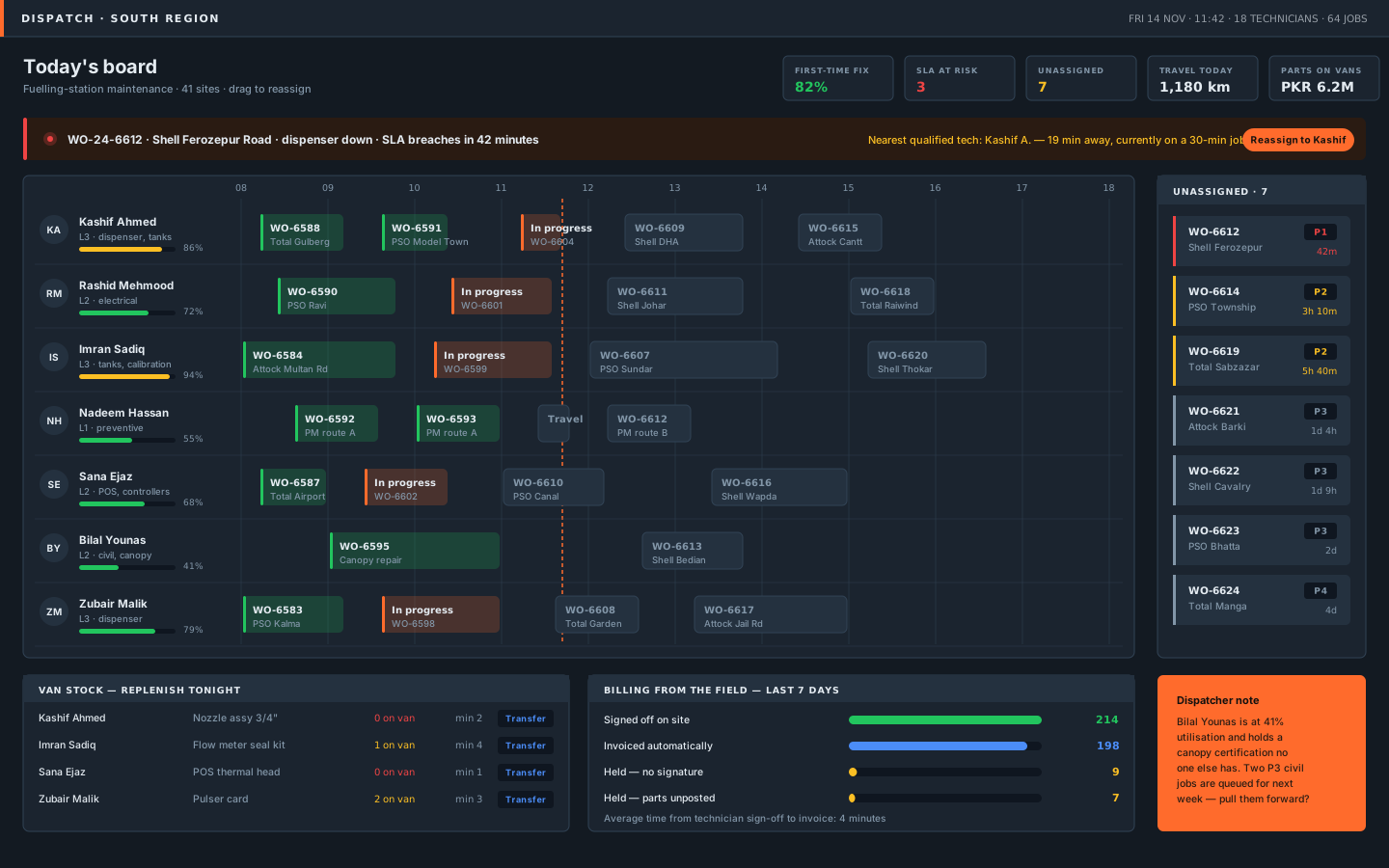
The dispatcher's morning
Technicians down the side with skills and utilisation, the day across the top, jobs as blocks you drag. A P1 job counting down to an SLA breach with the nearest qualified technician already identified. The unassigned queue ranked by time remaining, not by age. Underneath: van stock that needs replenishing tonight, and how much of last week's completed work turned into an invoice — with the reasons the rest didn't.
The same work order in the technician's hand
Three moments: the job list, the safety checklist with parts and photo evidence, and sign-off with the charges the customer is agreeing to. The app is offline-first because half the sites have no signal. On the right, what that single sign-off produces in the ERP — stock moves, a replenishment request, a timesheet line, asset history, an invoice, contract usage, and a warranty claim.
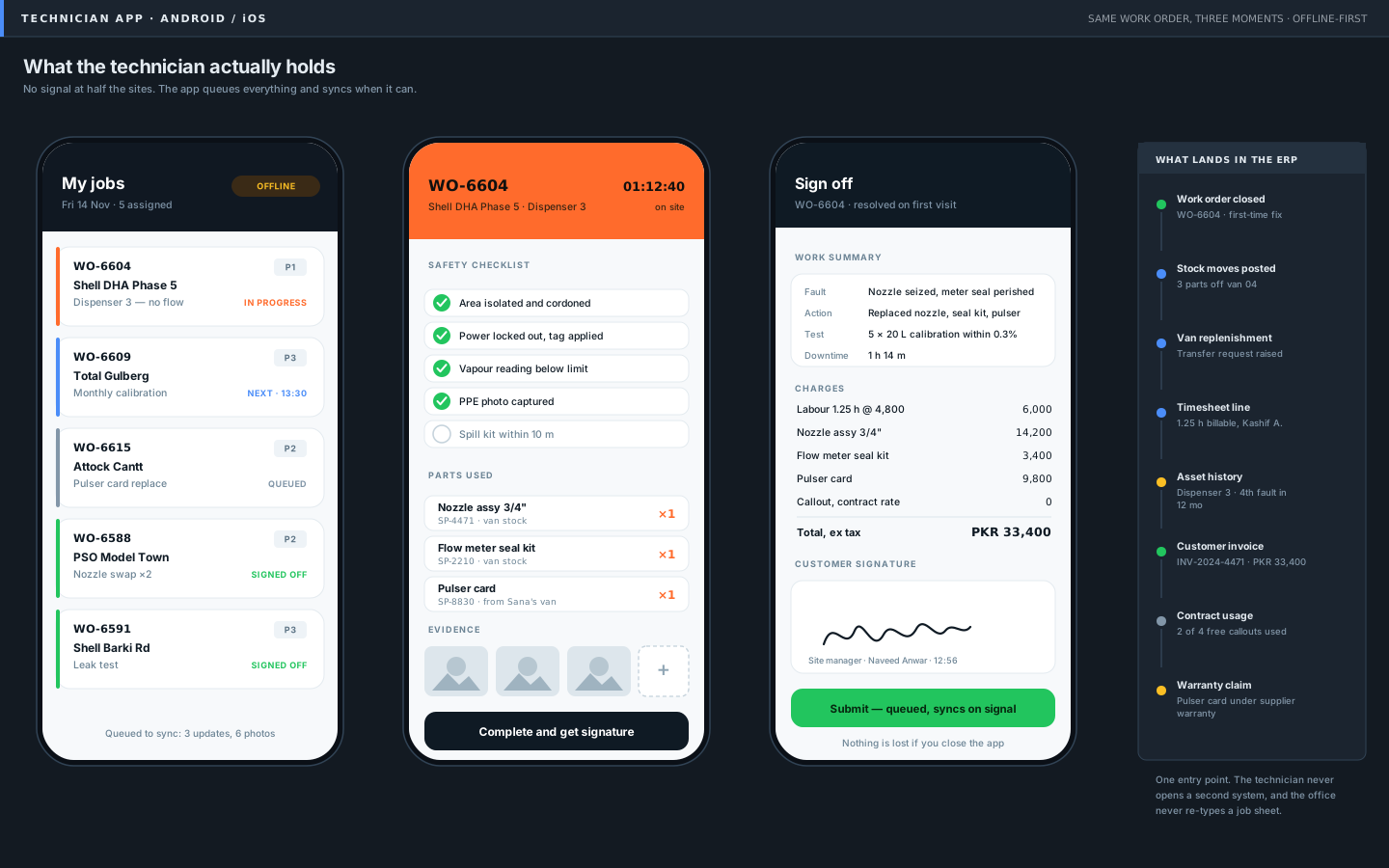
Illustrative data. Your instance is configured to your entities, currency and chart of accounts.
What we tailor
Your job types and priority matrix, your SLA tiers and escalation paths, your skill and certification matrix, your checklist and safety forms, your service report layout, van topology and minimum stock levels, contract entitlement rules, and your pricing — labour rates, callout terms, and what is and isn't chargeable.
Promise a scheduling optimiser will fix an understaffed rota. If the board is red because there aren't enough technicians, we'll say so in the fit review.
Weeks to live, in phases
Typical first crew live in 8–10 weeks. Preventive maintenance and contract entitlement usually follow in a second wave.
Connects to
What it moves
- First-time-fix rate
- SLA attainment
- Mean time to repair
- Technician utilisation
- Travel kilometres per job
- Days from completion to invoice
- Revenue leakage
- Van stock value
We baseline each of these in the fit review so the change is provable rather than asserted.
Yours at the end of the engagement
- The production system
- The mobile app in your own developer accounts
- Connector and app source in your repository
- Checklist and form definitions
- SLA configuration
- Runbooks
- The reporting layer
Relevant experience
Full Odoo roll-out across work orders, inventory, sales, purchase and accounting for a fuelling-station maintenance partner (Pakistan).
Custom B2B fleet-management mobile app built on Odoo and delivered through a GitHub Actions pipeline (Germany).
Helpdesk and ticketing workflows with SLA automation that improved customer response times (Germany).
IoT and connected-operations delivery alongside ERP for industrial clients.
Common questions
What happens with no signal on site?
Everything the technician does is stored on the device and queued. Checklists, photos, parts and signatures all survive the app being closed or the phone dying. It syncs when there's a connection, and conflicts are resolved against the server with the technician's version kept as evidence.
Do technicians actually use it?
They use it if it's faster than paper, which means the checklist has to be short and the parts list has to be searchable offline. That's a design constraint we hold during the build, and it's why we pilot with one crew before rolling out.
Can it handle subcontractors?
Yes — as restricted users with their own rate cards, seeing only their own jobs. Subcontractor cost lands against the same work order, so contract profitability stays true.
We already have Odoo. Can you add just this?
Often, yes. It starts with an audit of what you're running, because the parts of this blueprint that touch accounting and stock have to fit your existing setup rather than overwrite it.